

Cloud-based, multi-tenant SaaS · AI agents · Offline mode
Construction management software for SA developers
Wakha Software. Certified, claimed, paid. On time
Plan construction projects, track budgets, manage compliance and monitor site progress with one cloud-based software.
Trusted by 50+ construction companies
2,347 houses · 158 commercial buildings · 42 warehouses · 38 schools · 4 stormwater projects



Easy-to-use solution
Wakha is powerful yet simple software, replacing fragmented tools in one place.
5 hsaved per site manager, every week
+8%in planning progress
Reduce delays
By coordinating your teams with clear schedules, and tracking their progress daily.
Control your costs and cash flow
By building forecasts, monitoring your budgets and cash flow in real time.
Built for South Africa with local compliances
By managing all your documentation in one place, including B-BBEE procurement and NHBRC inspections.
Available in 12 South African languages
By choosing between English, Afrikaans, isiZulu, isiXhosa, Sepedi, Tswana, Sesotho, isiNdebele, Setswana, siSwati, Tshivenda, Xitsonga.
Who is Wakha Software for?
Compliant with
Built to meet South African regulatory requirements and industry standards.
Key features at a glance
See how Wakha manages your projects from feasibility to handover.
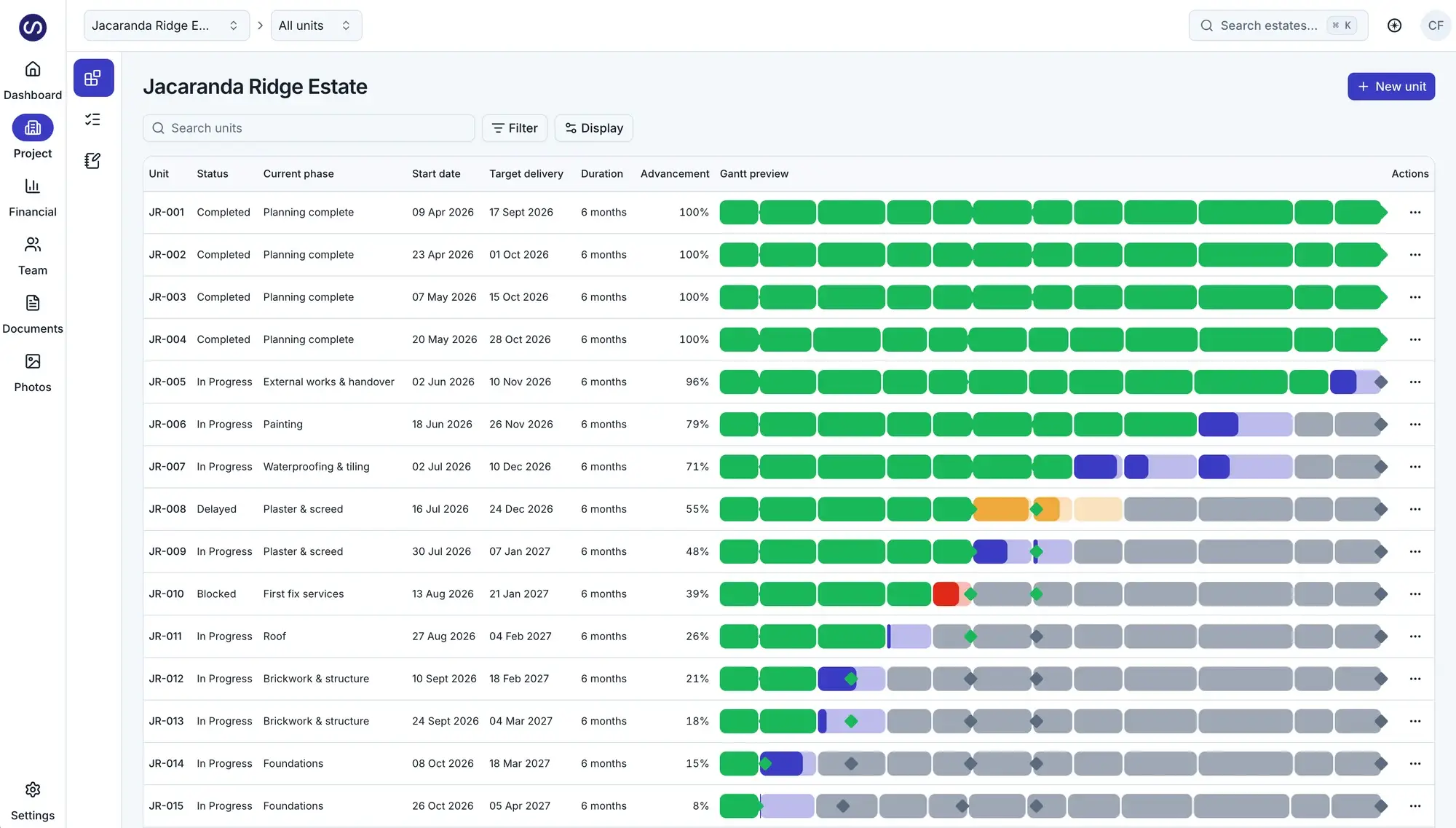
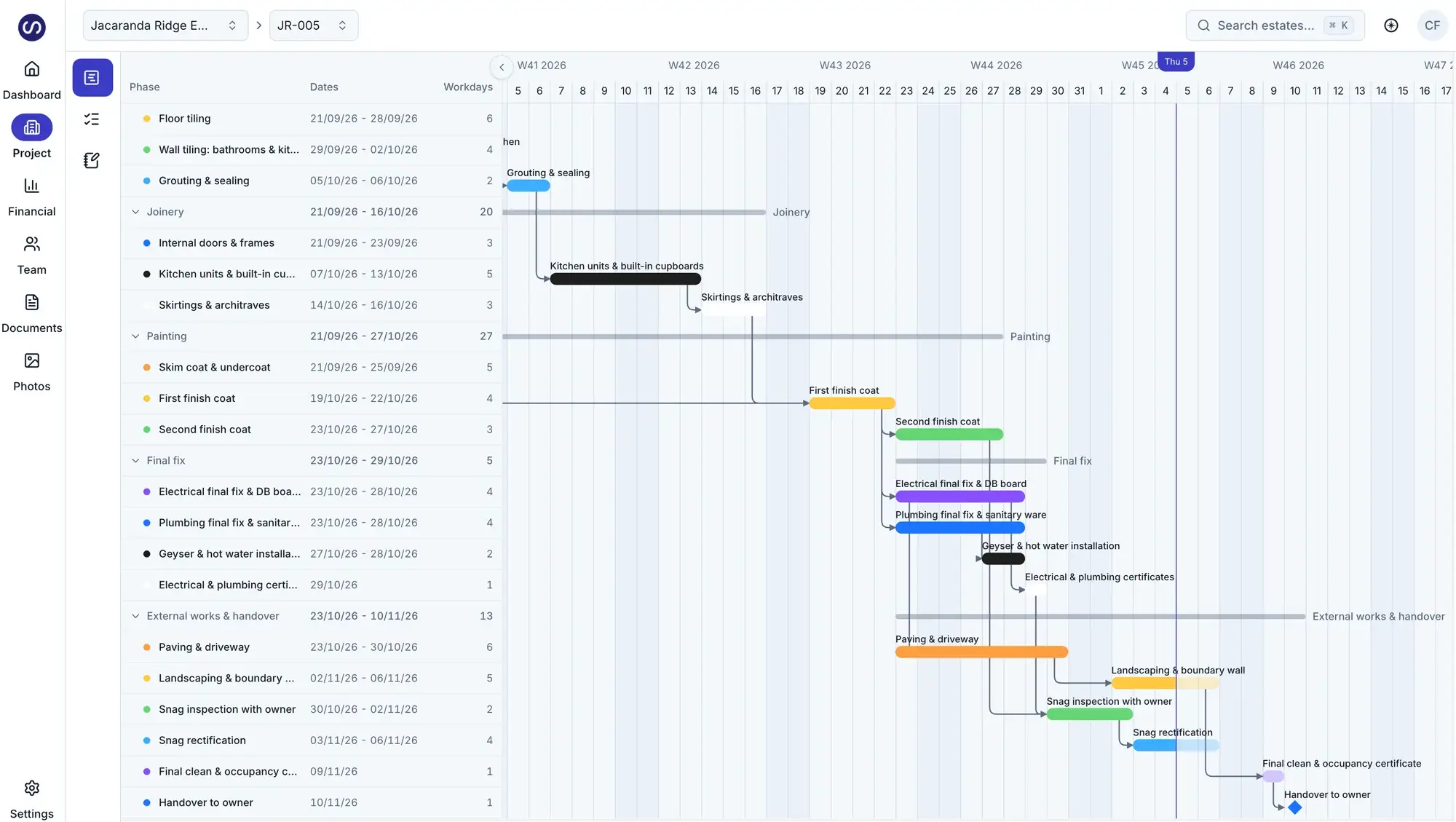
Gantt Scheduling
Interactive project timeline with milestones, dependencies, critical path analysis, and delivery date tracking.
Budget Management
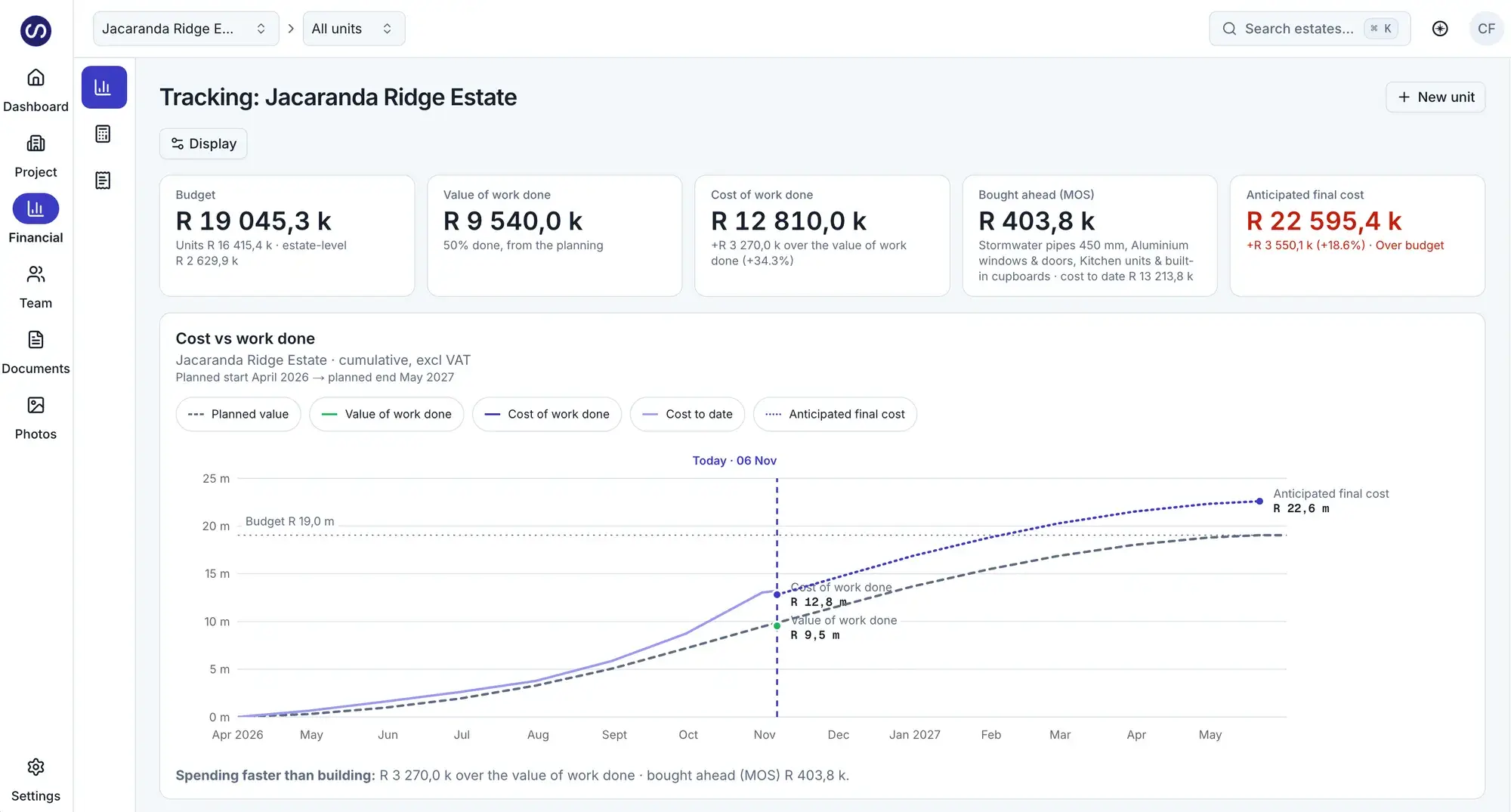
Reference budgets, actuals vs forecast tracking, variation orders, and cost-to-complete projections, all in ZAR.
Site Diary & Progress
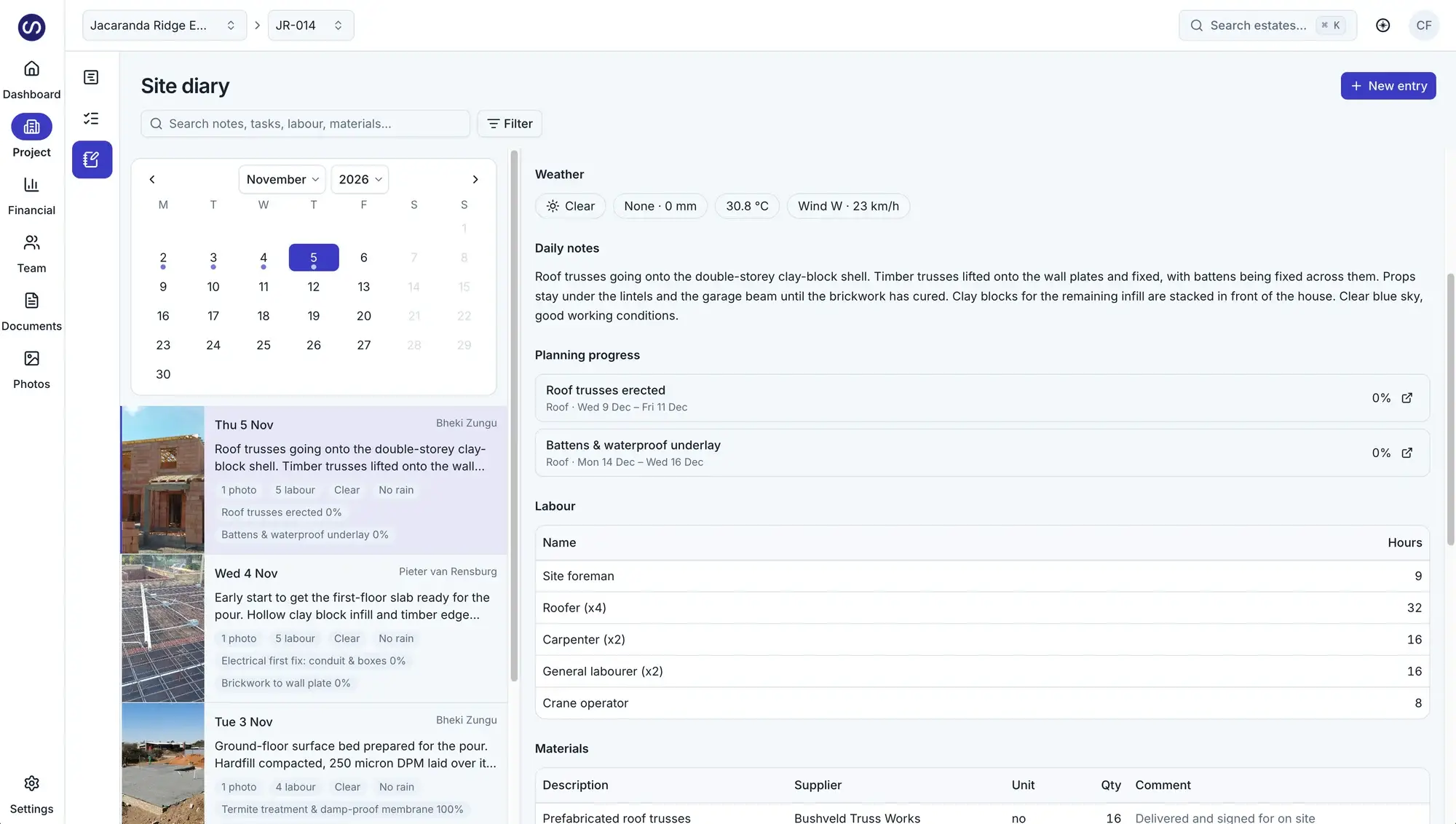
Daily logs, weather records, labour counts, photo/video progress capture, and safety incident reporting from mobile.
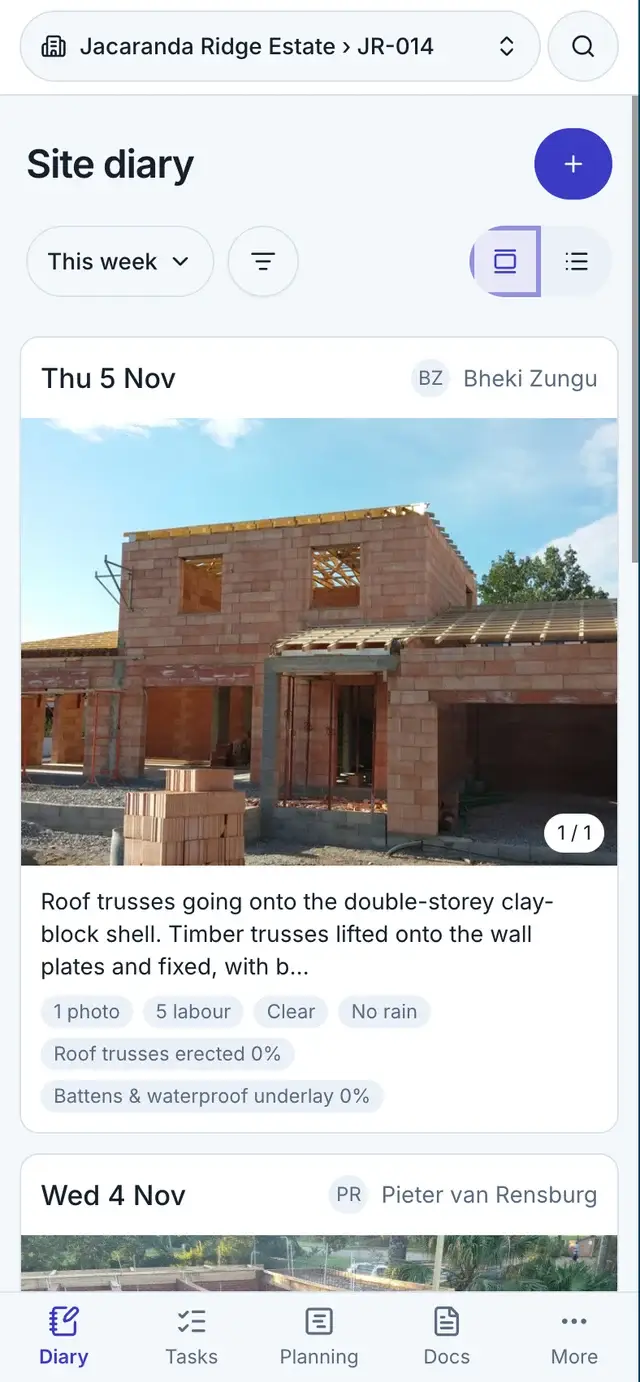
With our end-of-year shutdown coming up, we had a lot of deadlines to meet. Wakha has helped a lot. Everything is up to date and on one page, so I can see the progress on every job, even on my iPad. We can pinpoint immediately where something is falling behind and act sooner, whether that means putting in a bigger effort or moving more people onto that specific house or job.
The team is really happy with it. Kevin and Clément have also helped us fine-tune it for our specific needs.
We're definitely going to use it more, and over time we want to bring in the rest of the business, like buying and quantity surveying. I'm looking forward to it.
 FrancoisNelspruit Construction


See a product demo
Get a personalised walkthrough of Wakha and see how it fits your projects.
See a product demoNodes: AI agents that do the busywork to help you work faster
Inside every Skynode product, AI agents are available to automate repetitive tasks, always with your approval before anything is sent.

Pricing
60 days free, all features, no usage limits, no card needed.
| Starter | Team | Business | Scale | Custom | |
|---|---|---|---|---|---|
| Users | Up to 3 users | Up to 5 users | Up to 15 users | Up to 25 users | Unlimited users |
| Best for | Small builder, up to 3 office & site users | Small developer, 1–2 estates | Growing developer or main contractor | Established developer, several estates | Multi-estate developer, large site teams |
| ProjectGantt planning · Task tracker · Site diary · Timesheets · Dashboards · Documents · Mobile app | R599/mo | R1,399/mo | R2,349/mo | R3,449/mo | Custom |
| FinanceBudget · Variations log · Costs · Retention · Bought ahead (MOS) · Tracking · Cash flow · Materials | R749/mo | R1,699/mo | R2,799/mo | R3,998/mo | Custom |
| Full platformProject + Finance | R1,298/mo | R2,998/mo | R4,998/mo | R7,447/mo | Custom quote |
| Get started | Get started | Get started | Get started | Contact sales |
Starter
- Users
- Up to 3 users
- Best for
- Small builder, up to 3 office & site users
- ProjectR599/mo
- FinanceR749/mo
- Full platformR1,298/mo
Team
- Users
- Up to 5 users
- Best for
- Small developer, 1–2 estates
- ProjectR1,399/mo
- FinanceR1,699/mo
- Full platformR2,998/mo
Business
- Users
- Up to 15 users
- Best for
- Growing developer or main contractor
- ProjectR2,349/mo
- FinanceR2,799/mo
- Full platformR4,998/mo
Scale
- Users
- Up to 25 users
- Best for
- Established developer, several estates
- ProjectR3,449/mo
- FinanceR3,998/mo
- Full platformR7,447/mo
Custom
- Users
- Unlimited users
- Best for
- Multi-estate developer, large site teams
- ProjectCustom
- FinanceCustom
- Full platformCustom quote
What's included
Project
Gantt planning · Task tracker · Site diary · Timesheets · Dashboards · Documents · Mobile app
- Planning: Gantt / Kanban / Calendar phases, sub-phases & milestones, dependencies. Reuse templates
- Templates: build new estate & house planning from past projects
- Schedule signals: delayed phases and at-risk units flagged automatically, handover date always in view
- Phase panel: dates, progress, assignee, dependencies, linked tasks · a phase marked done in 3 taps
- Task tracker: estate & house, priority, owner, due date · a new task in under 10 s
- Site diary: add photos, weather, notes, labour, plant and materials on site
- Timesheets: crew hours logged by day
- Comments: on site diary entries, @mention a team member
- KPI Cockpit: track progress, delays, handovers, open tasks and NHBRC status on one screen
- Documents: folders per estate & house, handover pack checklist with missing files on top, versions, PDF preview
- Team: define role per crew member · invite contractors by email
- Mobile app: everything on mobile, works offline
Finance
Budget · Variations log · Costs · Retention · Bought ahead (MOS) · Tracking · Cash flow · Materials
- Budget: BOQ by house with consolidated view, linked to planning phases
- Templates: build new estate & house budgets from past projects
- Variations: date, item, amount, author, on top of the approved budget
- Costs: invoices, sub-contractor claims, petty-cash receipts · booked to section & BOQ item in one line, missing documents flagged
- Retention: 10% held automatically on sub-contractor claims
- Tracking: cost vs value of work done, anticipated final cost & trend, track deviation by section and by house
- Bought ahead (MOS): materials paid but not yet built in, by section or supplier and by age
- Cash flow: monthly actual, forecast and plan · plan spread automatically from the budget and the planning
- Signals: On budget / At risk / Over budget with thresholds you set
- Mobile: finance at a glance, houses that drift, a receipt added from a photo in under 30 s, offline
- Payment certificates: sub-contractor & progress certificates (JBCC / NEC / GCC)
- Materials: POs, stock & plant
Included in every plan
- Documents, number of projectsUnlimited
- Use it on your phoneMobile app, Offline modeIncluded
- Import your projectsBudgets / BOQ, plannings (Excel, Microsoft Project etc.)Included
Modules available
Ask us about modules.
Buyer portal
Plant & fleet management
Interfaces with other systems
Frequently asked questions
What property developers ask us most about Wakha.
Who is Wakha for?
Small and mid-sized residential builders and property developers in South Africa. Construction directors, project managers, site managers, quantity surveyors and administration teams work in the same software.
Which contracts does Wakha support for progress payments?
Progress payment certificates follow JBCC, NEC and GCC, with retentions, sub-contractor certificates and approvals from the field.
Does Wakha help with NHBRC and B-BBEE compliance?
Yes. Wakha handles NHBRC workflows, inspections and alerts, and tracks B-BBEE procurement with spend by BEE level and scorecard-ready exports.
Does Wakha work on site without signal?
Yes. Wakha has a mobile application with an offline mode, so the site diary, photos and progress captured on site sync automatically once you are back online.
Is Wakha cloud-based?
Yes. Wakha is cloud-based, multi-tenant SaaS: no on-premise servers to install, and pre-built templates get you running in days, not months.
How is Wakha priced?
Wakha is priced monthly in rand by number of users: Starter (up to 3), Team (up to 5), Business (up to 15), Scale (up to 25) and a Custom tier for unlimited users. In each tier you choose Project, Finance or the Full platform with both. Every tier starts with a 60-day free trial, no card needed.
Ready to see it in action?
Tell us about your project and book a demo with us
- Live demo on your kind of project
- Onboard with a dedicated Skynode member when you start
- Use our software for free for 60 days, including all our features